
Grocery & kiryana
Grocery store POS software for kiryana shops.
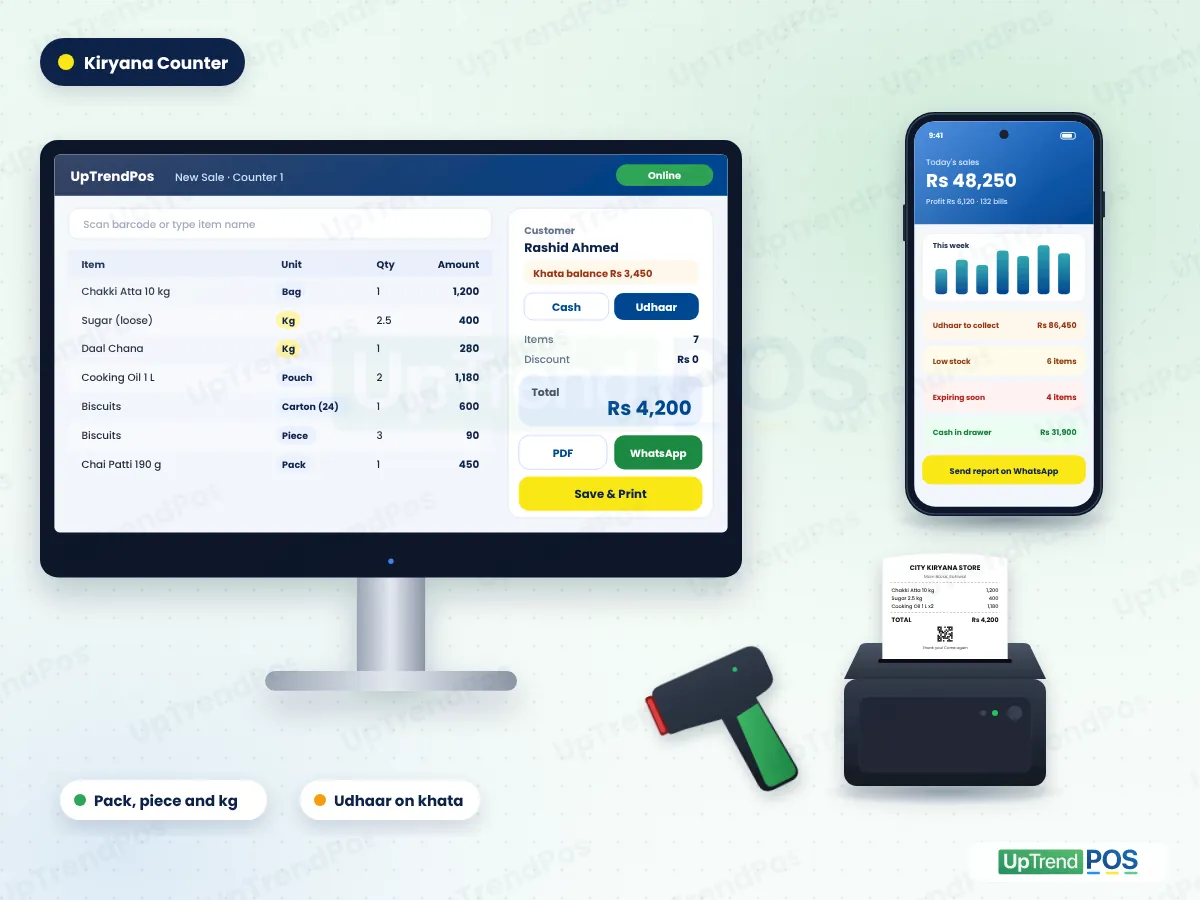
UpTrendPos is grocery store POS software for kiryana shops, general stores and marts in Pakistan. Start with about 7,000 grocery products already loaded. Sell by carton, pack, piece or kg, keep every udhaar in a khata and get stock and expiry alerts. Start on your phone with a small Type-C printer, or on a PC. Billing keeps running when the internet is off.
Kiryana demo in Urdu or English · Setup help on WhatsApp
- Works offline
- FBR-ready invoices
- Windows, Android & Web
- 7,000 products ready
- Sell by carton, pack, piece or kg
- Print from your phone
- Bills on WhatsApp
- Udhaar khata
- Expiry alerts
- Barcode billing
- Works without internet
- FBR invoice and QR code
Common problems kiryana store owners face without POS software
Running a grocery store in Pakistan is hard work. You sell hundreds of items, deal with daily rush, distributors, rate changes and udhaar. When all of this is on paper, mistakes happen every day. Good grocery store POS software fixes these problems first.
-
The problem
Udhaar gets lost in the register
Pages tear, names get mixed and customers argue about the total.
Every credit sale goes into the customer khata on its own.
-
The problem
Long lines at rush hour
Writing and adding bills by hand is slow, so customers leave.
Scan or search, and the bill is ready in seconds.
-
The problem
Stock expires on the shelf
Biscuits, oil and milk packs expire before anyone sees them.
Expiry alerts show what to sell first or return.
-
The problem
Wrong prices and missing bills
Old rates, double billing and lost slips eat your profit.
One price list, and every bill is saved with its own number.
-
The problem
Cash does not match
At night the drawer is short and nobody knows why.
Cash sessions show what each cashier collected.
-
The problem
No idea of real profit
Sales look good, but expenses and udhaar hide the real number.
Profit, expenses and udhaar on one screen, every day.
No computer? Run your kiryana store from your phone
Many small kiryana shops have no computer and no printer. With our grocery store POS software, your Android phone is enough to start. Add a printer later, or never.
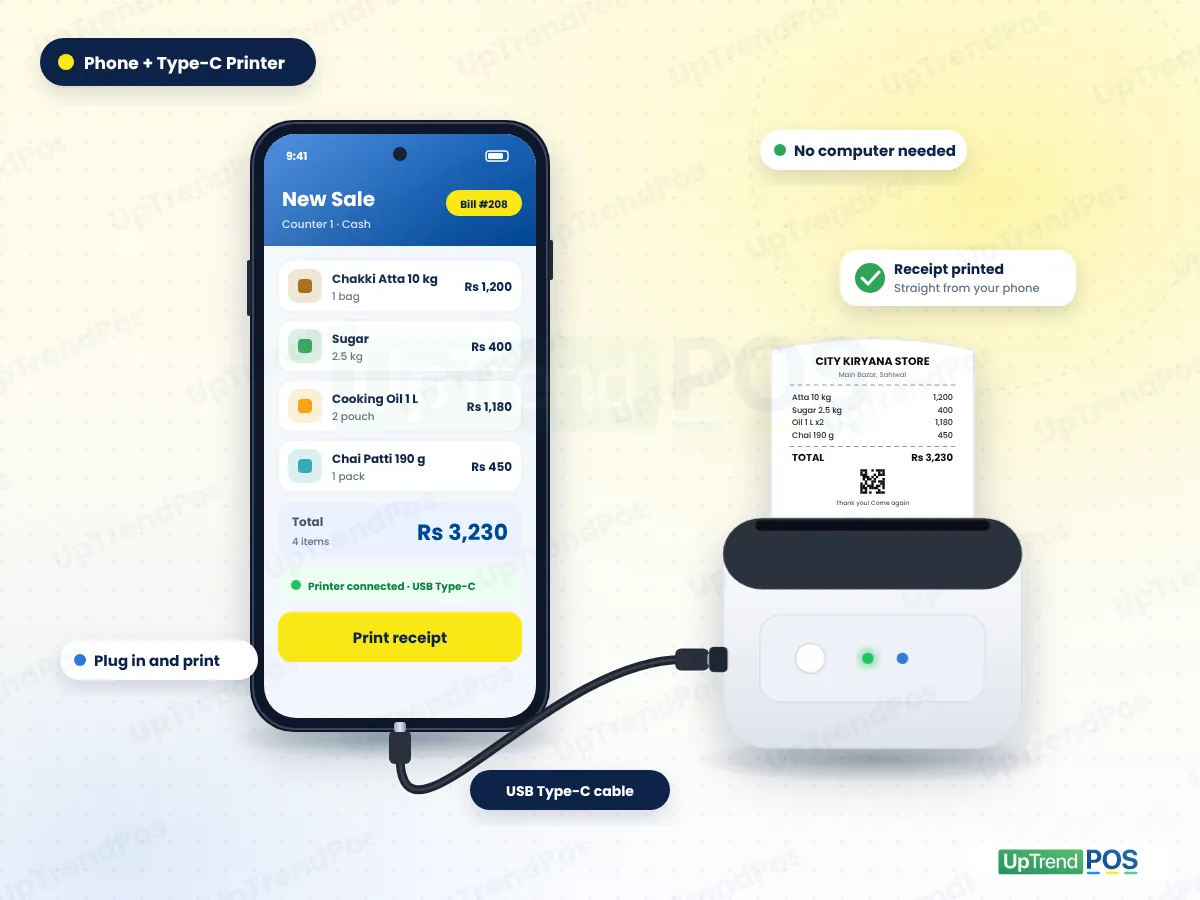
Print receipts from your phone with a Type-C printer
Buy a small thermal receipt printer and connect it to your phone with a USB Type-C cable. Make the bill in the app and tap Print. Your customer gets a proper paper receipt, just like at a big mart.
- No computer, laptop or tablet needed
- Plug the cable in and print the bill
- Shop name, items, total and thank-you line on every receipt
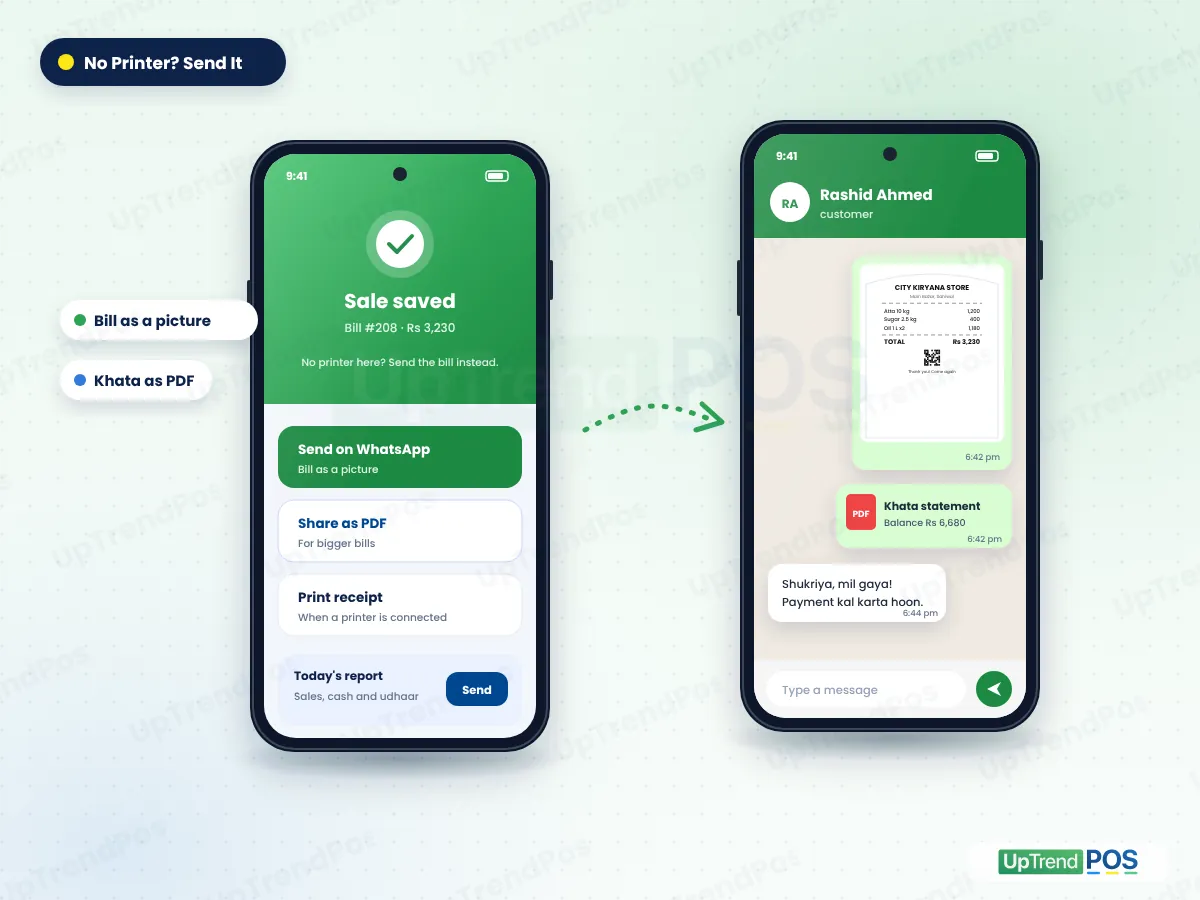
No printer? Send the bill and reports on WhatsApp
Not ready to buy a printer? Send the bill to your customer on WhatsApp as a picture or a PDF. You can also send an udhaar customer their khata statement, and share your day report from the same phone.
- Customer gets a clear bill on WhatsApp
- Udhaar customers see exactly what they owe
- No paper, no lost slips, no fights about the total
What you can do with our grocery store POS software
UpTrendPos is complete grocery store POS software made for Pakistani shops. Billing, stock, udhaar, purchases and accounts are all connected, so you enter each thing only once.
Make fast, correct bills
- Bill a full trolley in seconds at rush hour
- Right price every time, no calculator
- Print it or send it on WhatsApp
See your stock live
- Stock goes down with every sale
- Stock goes up when goods arrive
- Alerts before items run out or expire
Keep every udhaar safe
- Credit sales go to the khata on their own
- Take full or part payments
- Send the statement on WhatsApp
Handle suppliers and purchases
- Purchase orders and goods received
- What you owe each distributor
- Returns to the supplier on record
Know your daily profit
- Sales, expenses and profit for the day
- This week and this month side by side
- Reports on your phone, anywhere
Grow to more counters and branches
- Staff logins for every cashier
- Each branch keeps its own stock
- The owner sees everything in one account
Grocery store POS software features, in full detail
Here is everything a kiryana store or mart gets in UpTrendPos. All of it is built and working in the app today. Choose Grocery and Kiryana when you sign up, and these tools open ready for your shop.
Billing at the counter
- Barcode scanning with any USB scanner
- Search items by name in a few letters
- Sell by carton, pack, piece or kg
- Discount on the bill
- Cash, bank or udhaar payment
- Thermal receipt or A4 invoice with your logo
- Bill on WhatsApp as a picture or PDF
- Returns and bill edits keep the same invoice number
Stock and inventory
- Ready catalog of about 7,000 grocery products
- Live stock that moves with every sale and purchase
- Low stock and out of stock alerts
- Expiring and expired item alerts
- Batch-wise stock and expiry report
- Demand list of items to reorder
- Damage, sample and stock audit entries
- Stock value at cost and at sale price
- Categories, brands and units
Udhaar khata and customers
- Every credit sale goes to the customer ledger
- Full or part payments, any time
- Opening udhaar for your old customers
- Khata statement as PDF, print or WhatsApp
- Udhaar age: 0-7, 8-15, 16-30 and 30+ days
- Each customer's bills and payments in one place
- Installments (kist) for big items Enterprise+
Suppliers and purchases
- Supplier records and supplier ledger
- Purchase order, goods received (GRN) and purchase invoice
- Purchase returns to the supplier
- Supplier payments and balance due
- Credit days per supplier and payable age
- Print purchase orders and GRN on A4
- Average cost updates on its own, so profit stays right
Reports and accounts
- Daily sales report and sales history
- Profit dashboard Enterprise+
- Profit and loss and monthly closing Enterprise+
- Expenses by category
- Day book, trial balance and balance sheet
- Cash flow, receivables and payables
- Reports as PDF to save or share
Staff, branches and safety
- Staff logins with their own access
- Open and close cash sessions per shift
- Cashier records of what each person collected
- Audit trail of deletes and changes Enterprise+
- Period lock so closed days stay closed
- Backup and restore
- More branches with their own stock and prices
- Attendance, salary and staff commission Custom
Enterprise+ means Enterprise and Custom plans. Everything else is in every plan of our grocery store POS software. See what each plan includes
Grocery store POS hardware you need to get started
You do not need a costly branded machine. Our grocery store POS software works with common devices from any computer market in Pakistan. Start with a phone and add the rest when your shop grows.
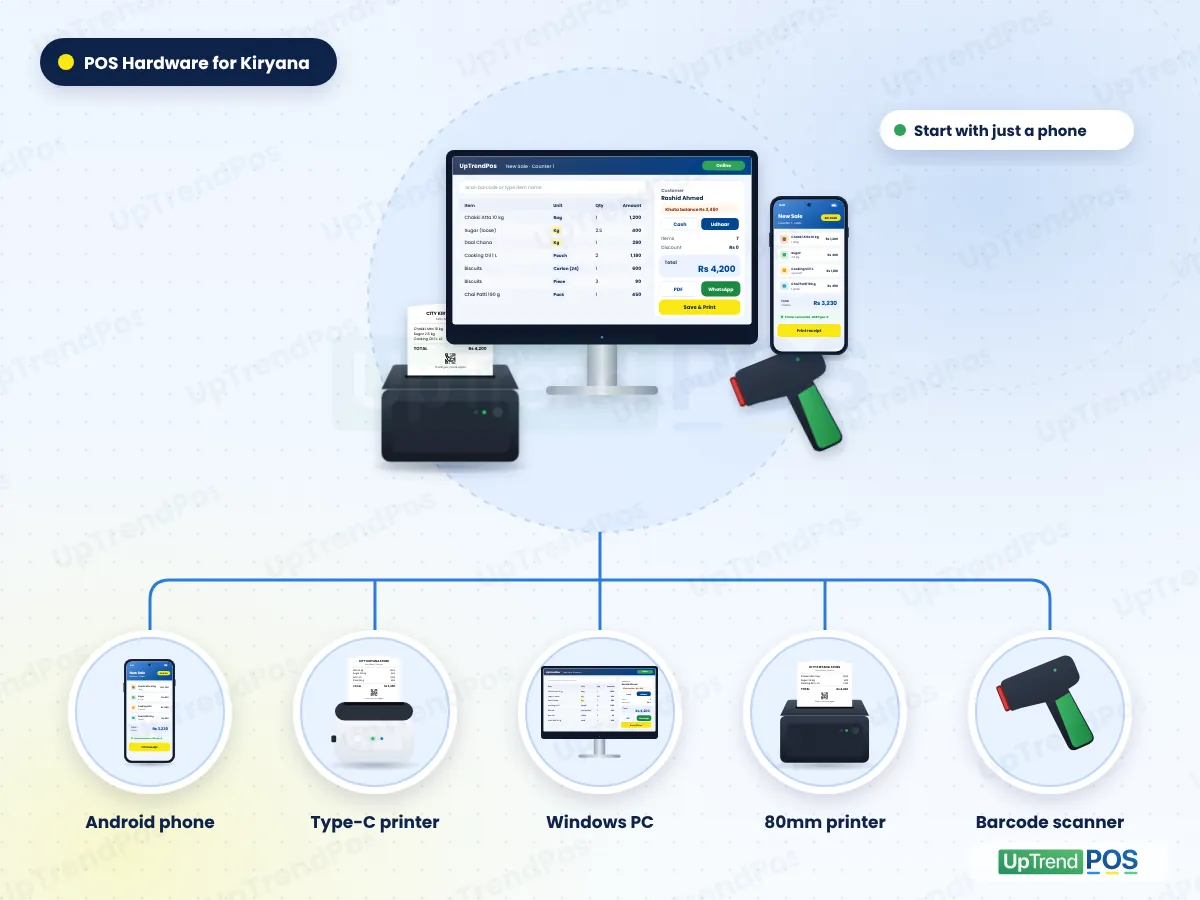
Android phone
Start here. Billing, udhaar, stock and reports all run on the phone.
Small Type-C printer
Plugs into the phone with a USB Type-C cable and prints receipts.
Windows PC or laptop
Windows 10 or 11 for a busy counter with many items.
80mm receipt printer
A thermal printer by USB for the PC counter. No ink needed.
USB barcode scanner
Plug and play. Scan packed items and bill in seconds.
Barcode label printer
Print price stickers for loose and packed items. Enterprise+
Already have a printer or scanner? Send us the model on WhatsApp and we will tell you if it works with our grocery store POS software.
Start small, grow when you are ready
Our grocery store POS software works on all three setups. Pick the one that fits your shop today. All three use the same account, so you can add a PC later and nothing is lost.
Phone only
For a small shop run by the owner
- Android phone with the UpTrendPos app
- Bills on WhatsApp as a picture or PDF
- Udhaar khata, stock and day report
Phone and Type-C printer
For a busy small shop that needs paper receipts
- Everything in phone only
- Small thermal printer by USB Type-C cable
- Paper receipt for every customer
Counter PC
For marts with many items and staff
- Windows PC with the UpTrendPos app
- USB barcode scanner and 80mm printer
- Owner checks sales on the phone app
Not sure what to buy? See the POS hardware guide or get the app from the download page.
How grocery store POS software works, from stock-in to profit
This is the full daily cycle of a kiryana store in our grocery store POS software. Each step feeds the next one, so stock, udhaar and accounts always match.
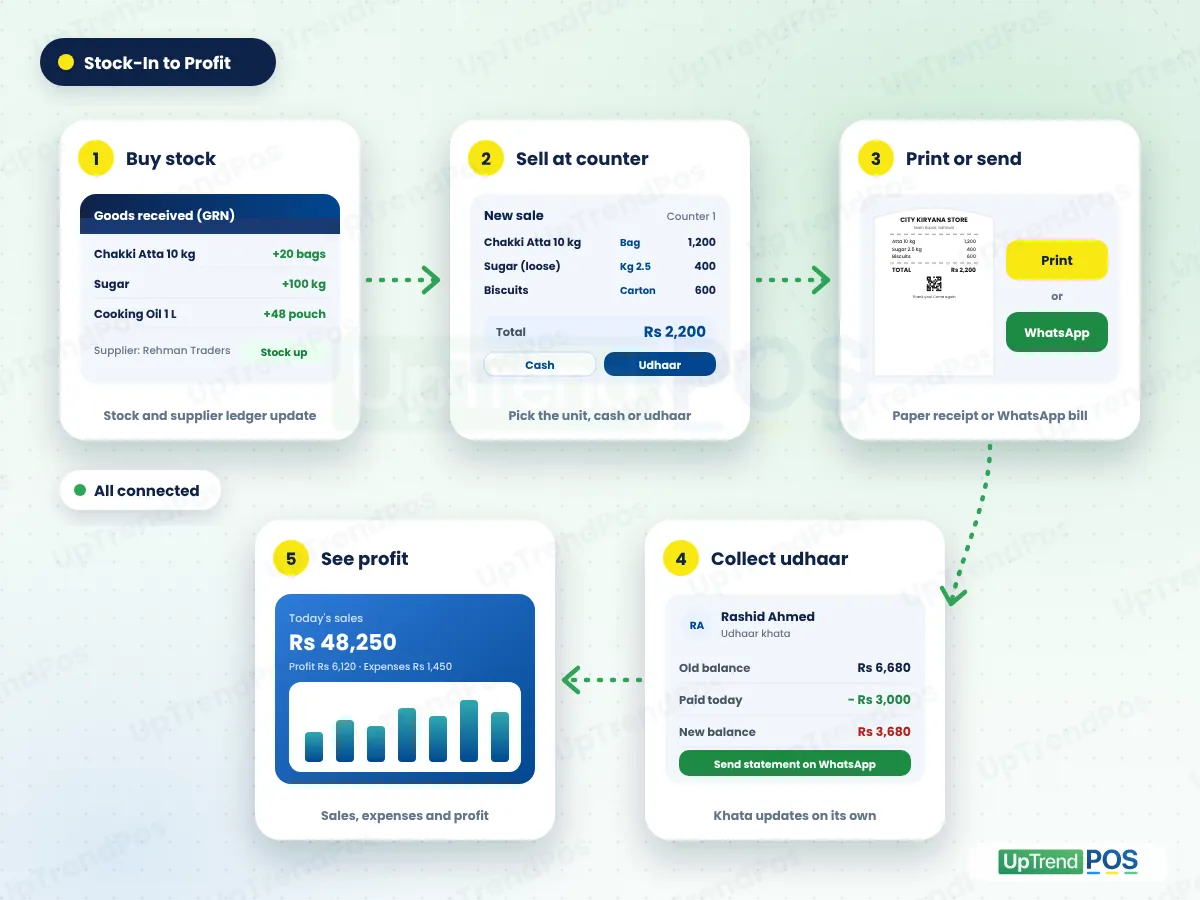
- Buy stockMake a purchase order. When goods arrive, save the GRN. Stock goes up and the supplier ledger updates.
- Sell at the counterScan or search the item, pick the unit (carton, pack, piece or kg) and choose cash or udhaar.
- Print or send the billPrint a receipt, or send the bill on WhatsApp as a picture or PDF.
- Collect udhaarWhen a customer pays, save the payment. The khata updates and you can send the new statement.
- See your profitSales, expenses and profit go into your accounts on their own. Check the day report at night.
Getting started with our grocery store POS software takes four steps: sign up, add your items, connect your printer and make your first bill. Send us your item list in Excel or a clear photo and our team helps you load it.
Keep billing during load-shedding
Light goes, the UPS beeps and the internet drops right when the shop is full. Your counter should not stop. That is why our grocery store POS software is built offline-first. Bills save on your phone or PC first and sync to your account on their own when the internet comes back. Nothing is entered twice.
Cash bills work offline. Udhaar sales need internet, so the khata stays the same on every device.
Top benefits of UpTrendPos in your grocery store, every day
Small changes at the counter add up to real money by the end of the month. This is what shop owners get from grocery store POS software that fits their shop.
- Faster checkoutCustomers do not wait at rush hour, so fewer walk away.
- No udhaar forgottenEvery rupee of credit is on record with the date and the bill.
- Less money lost to expiryYou see expiring items in time to sell them first or return them.
- The right stock orderThe demand list tells you what to buy before the shelf is empty.
- Cash that matchesEach shift has its own cash session, so shortages show up the same day.
- Real profit, every daySales, cost and expenses come together, so you know what you earned.
Reports a kiryana owner checks every day
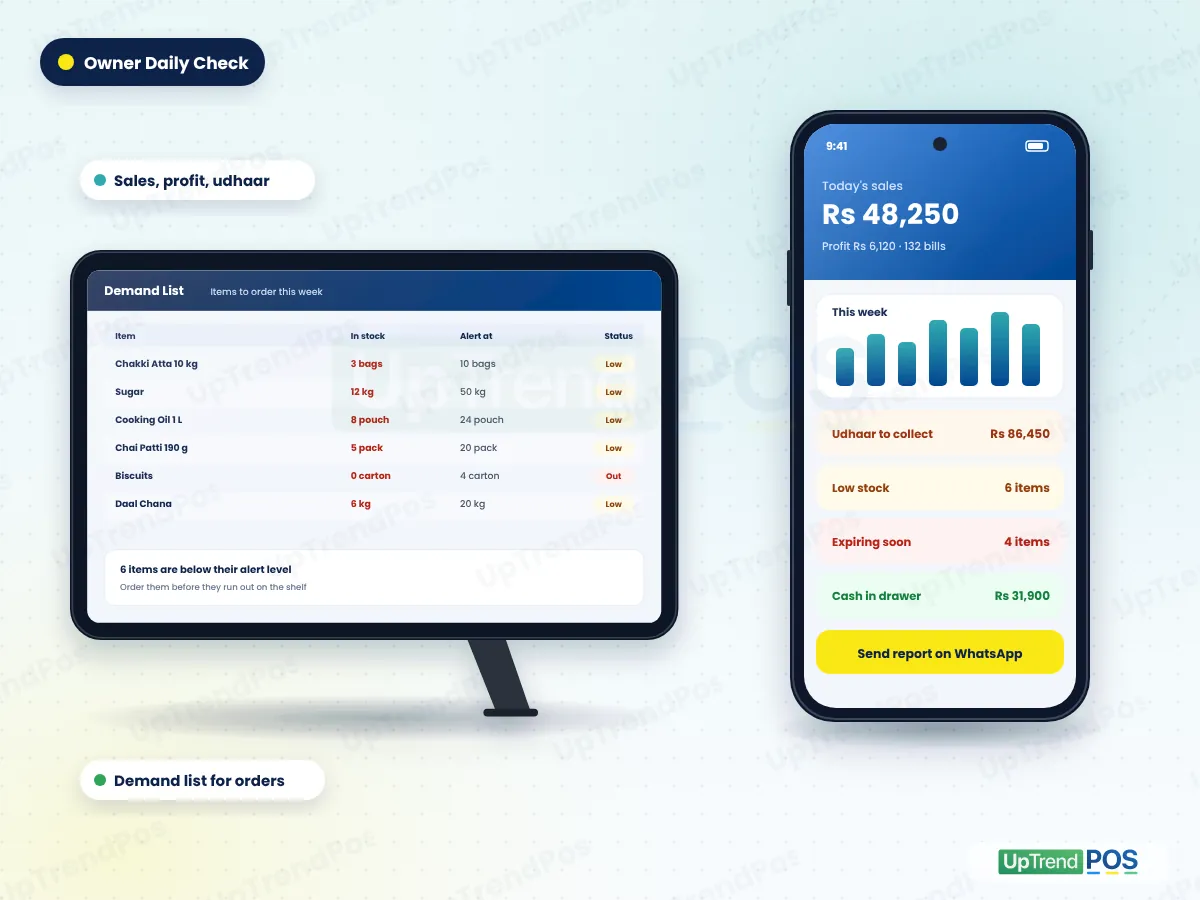
You do not need to sit at the shop to know how the day went. Our grocery store POS software puts these reports on your phone. Open the app at home or send the report to yourself on WhatsApp.
- Today's sales and profitSales, bills, profit and cash in the drawer for the day, with this week and this month next to it.
- Udhaar to collectEvery customer who owes you, sorted by how old the udhaar is: 0-7, 8-15, 16-30 and 30+ days.
- Stock and demand listLow stock, expiring items and what to reorder before your distributor comes.
More reports in the app
- Sales history
- Profit and loss
- Monthly closing
- Day book
- Stock valuation
- Batch and expiry
- Expenses by category
- Supplier payables
- Cash sessions
- Trial balance
- Balance sheet
- Cash flow
Safe shop data and FBR-ready invoices
Your sales, udhaar and supplier records are business secrets. Bigger stores also need FBR invoices. Our grocery store POS software takes care of both.
Your shop data stays yours
- Each shop's data is kept separate from every other shop
- Staff only see what their login allows
- Audit trail of deletes and changes Enterprise+
- Period lock stops changes to closed days
- Backup and restore for your shop data
- Bills save on the device first, then sync to your account
FBR-ready receipts for marts
- FBR invoice number and QR code on each bill Enterprise+
- Buyers can check the bill on the FBR verification site
- Add your FBR POS details once, then every bill is reported
- The FBR POS service fee is added to the bill as the rule says
- Your shop name, logo and address on thermal or A4 invoices
- Not on FBR POS? Keep it off and bill as normal
Read more about the FBR invoice and QR code on every receipt, or the rules on the official Federal Board of Revenue website.
Grocery store POS software for every kind of grocery business
From a one-man kiryana shop in a street to a supermarket with many counters, UpTrendPos grocery store POS software fits the way you sell.
Small kiryana shop
Run the whole shop on a phone. Print with a Type-C printer or send bills on WhatsApp, and keep the udhaar khata.
General store and mini mart
Barcode billing, stock and expiry alerts, and a separate login for each helper at the counter.
Supermarket and departmental store
Many counters, cash sessions per shift, barcode labels and FBR invoices for a Tier-1 store.
Wholesale kiryana
Sell by carton and bag, give quotations first, and keep udhaar for the shopkeepers you supply.
Grocery chain with branches
Each branch keeps its own stock and prices. The owner sees all branches from one account.
Phone order and home delivery shop
Take the order on a call, send the bill on WhatsApp, and collect cash or add it to the khata.
Which plan fits your grocery store?
Every plan of our grocery store POS software has unlimited bills. Plans change by branches, users and a few advanced tools.
Premium
One kiryana shop
One branch and up to 3 users. Billing, stock, udhaar, purchases, expenses and accounts.
Enterprise
A busy mart
Up to 2 branches and 6 users. Adds barcode labels, FBR invoices, profit reports and audit trail.
Custom
A small grocery chain
Up to 3 branches and 9 users, with every module, including staff attendance, salary and commission.
Grocery store POS software questions
Which is the best grocery store POS software in Pakistan?
The best grocery store POS software is the one that fits a kiryana counter. Check five things: it sells by pack, piece and kg, keeps udhaar, works offline, prints from a phone, and your staff find it easy. UpTrendPos does all five, and you can test it free for 14 days.
Is UpTrendPos good for a small kiryana shop?
Yes. A small shop can run the full system on one Android phone. Make bills, keep the udhaar khata and check stock on the phone. Add a small Type-C printer for paper receipts, or send bills on WhatsApp. You can move to a PC later without losing any data.
Do I need to enter all my grocery products myself?
No. UpTrendPos comes with a catalog of about 7,000 grocery products. Search, pick the items you sell and add them to your shop. Then set your own prices and stock when goods arrive. Missing an item? Add it yourself in a minute.
Can I print receipts from my phone without a computer?
Yes. Connect a small thermal receipt printer to your Android phone with a USB Type-C cable, make the bill and tap Print. No computer, laptop or tablet is needed. Message us before you buy a printer and we will tell you which one works well.
I have no printer. How does my customer get a bill?
Send the bill on WhatsApp. After the sale, tap Send and the bill goes to the customer as a picture or a PDF. You can also send khata statements to udhaar customers and share your day report from the same phone, with no printer at all.
Does it work during load-shedding or without internet?
Yes. Cash billing keeps running on the Windows and Android apps when the internet or light goes. Bills save on the device and sync on their own later, with no double entries. Udhaar sales need internet so that every device shows the same khata.
Can I sell atta by bag and sugar by kg?
Yes. Set the units for each item once, such as carton, pack, piece or kg. At the counter, pick the unit and type the quantity, like 2.5 kg. The bill and your stock both use the right unit, so the stock count stays correct.
How does this kiryana store software keep udhaar?
Every credit sale goes into that customer's khata on its own. You see the total each customer owes and how old the udhaar is. When they pay, save a full or part payment and send the updated statement on WhatsApp, so there is no argument.
Can it track expiry dates of grocery items?
Yes. Add the expiry date when stock comes in. The dashboard shows expiring and expired items, and the batch-wise report lists each batch with its date. Sell the oldest stock first, or return it to the supplier before it becomes a loss.
Does UpTrendPos support FBR invoices?
Yes, on the Enterprise and Custom plans. If your store is registered with FBR for POS, add your FBR details once. Each bill then prints an FBR invoice number and a QR code that buyers can check. Shops not on FBR POS can keep it off.
How much does grocery store POS software cost?
It depends on your plan. Premium suits one shop, Enterprise suits a busy mart and Custom suits two or three branches. You can pay monthly or yearly, and every new shop gets a 14-day free trial first. See all prices on our pricing page.
Can I use more than one counter or branch?
Yes. Add more counters with separate staff logins, and each branch keeps its own stock and prices. The owner sees every counter and branch from one account. Branch and user limits depend on your plan, and we can quote for more.
Also selling these? See their setup
Try UpTrendPos in your kiryana store for 14 days
Start on your phone today, or message us and we will set it up with you. Simple grocery store POS software, made for Pakistani shops.