

FBR number and QR on every bill
Each bill goes to FBR and comes back with its FBR invoice number. The QR code prints on the receipt.
Daily needs and health
Grocery & KiryanaPharmacy & MedicalCosmetics & BeautyFashion
Clothing & GarmentsTailoring & BoutiqueShoes & FootwearElectronics and solar
Solar ShopMobile & ComputerElectronics & CCTVSee all business typesCall 0319 2223292 · Mon to Sat, 10 am to 7 pm
For Tier-1 retailers
UpTrendPos gives you ready FBR POS integration. Add the details FBR gives you, turn FBR on, and every bill prints an FBR invoice number, a QR code and the Re 1 POS fee. Billing, stock and udhaar keep working as normal, even when the internet goes off.
Free setup call in Urdu or English · We test your first FBR bill with you
If you are a Tier-1 retailer, FBR POS integration is required by the Sales Tax Act, 1990. These are the costs of waiting.
Source: Sales Tax Act 1990 sections 3(9A), 8B(6), 14AB and 33, and the Sales Tax Rules, 2006 (Chapter XIV). Rules change, so always check the latest on the FBR website. This is general guidance, not tax advice.
Tick every line that is true for your shop. One tick is enough to make you Tier-1.
Not sure about one line? Tick what you know and send it to us. We will tell you what applies to your shop.
My shop is...
Tick the lines that are true for your shop. If none apply, you are likely not Tier-1, but you can still use FBR invoices if you are sales tax registered.
Send my result on WhatsAppUpTrendPos has it built in. There is no extra software to buy and nothing to install. You only add the details FBR gives you and turn it on.
Each bill goes to FBR and comes back with its FBR invoice number. The QR code prints on the receipt.
The FBR POS service fee is added to each FBR bill and shown on the receipt, so you never add it by hand.
Each counter keeps its own POS registration and terminal ID, as FBR rules ask.
Learn the bill in Practice mode, test with FBR Sandbox, then switch to Production when your details arrive.
Billing keeps running when the internet goes. Bills are kept safe and reported when the connection is back.
FBR is not a separate app. The same bill updates stock, customer khata, sales reports and accounts.
Registered for sales tax but not Tier-1? Turn on Local GST to show a GST line on bills without FBR.
Each branch and counter is set up with its own FBR details. The owner sees every branch in one account.
Your FBR token and keys stay inside your shop account. Only staff you allow can open FBR settings.
FBR invoices come with the Enterprise and Custom plans. Compare UpTrendPos plans
Most of the work is your FBR registration. The UpTrendPos side takes a few minutes, and our team does it with you on WhatsApp.
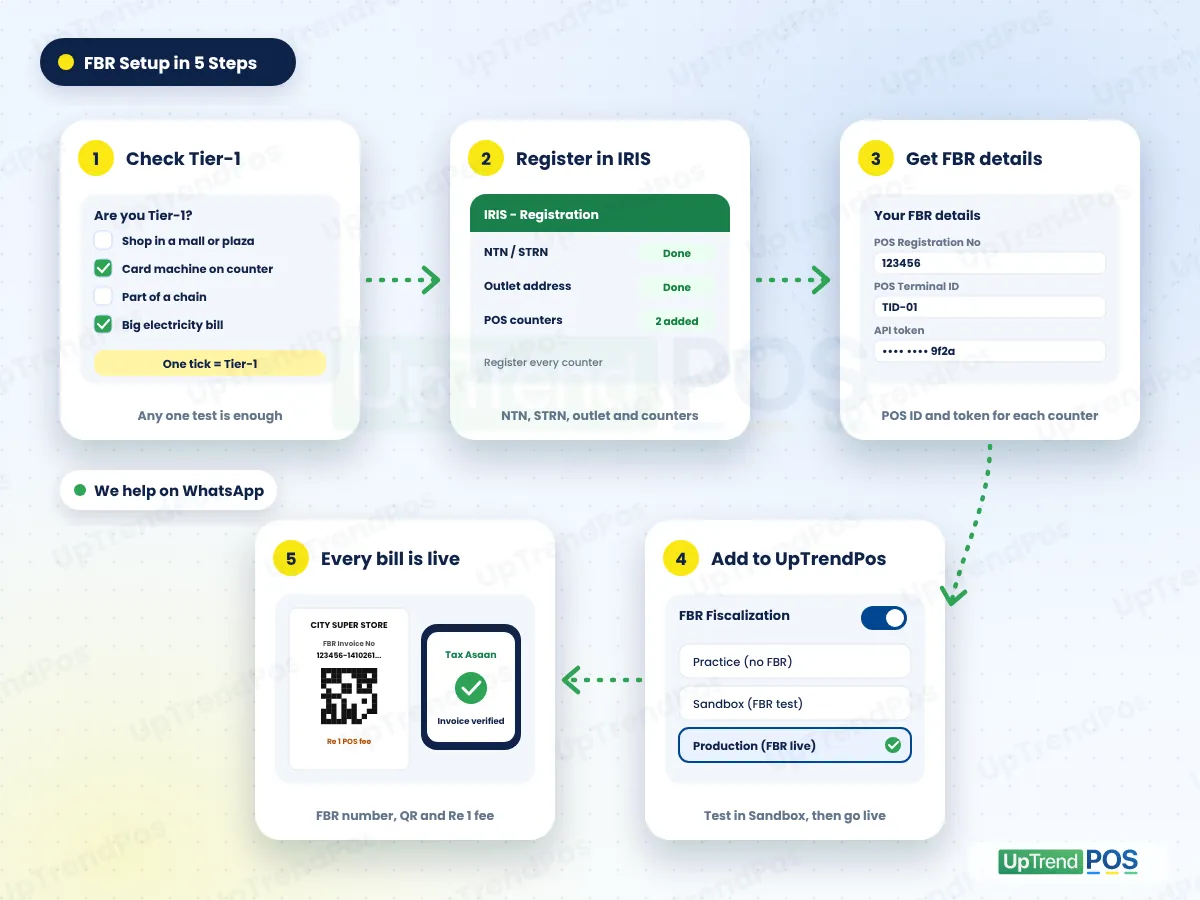
Need help with IRIS? Ask us on WhatsApp. We guide you, or work with your tax advisor.
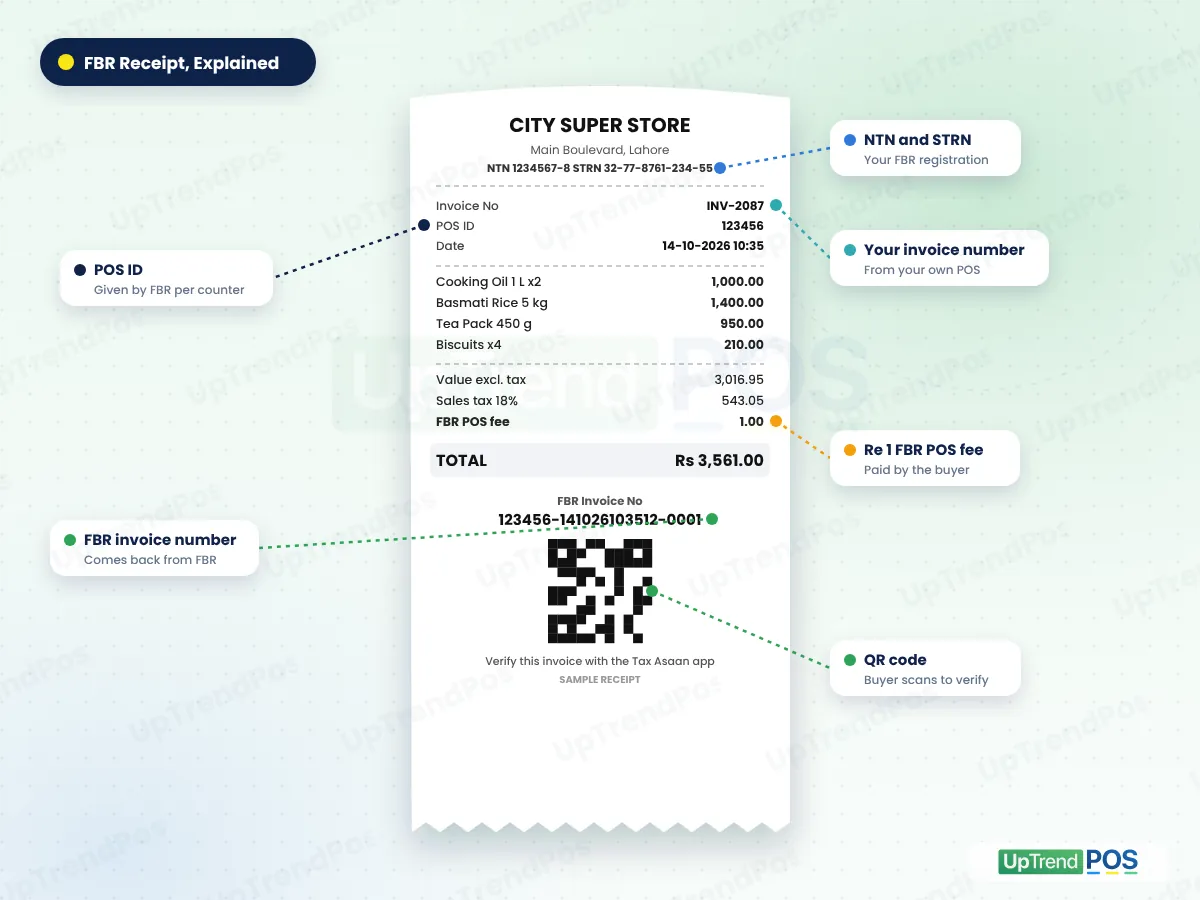
FBR asks for a set format on every bill from an integrated counter. UpTrendPos prints all of it on thermal receipts and A4 invoices:
You choose the mode in FBR settings. Start safe, test properly, then go live with confidence.
| Mode | Use it for | Reported to FBR? |
|---|---|---|
| Practice | Learn the FBR bill layout and train your staff before your FBR details arrive | No. Practice bills are not FBR invoices. Do not hand them out as FBR bills. |
| Sandbox | Test your real FBR details on FBR's test system | Only to FBR's test system, not to your real records |
| Production | Your live FBR POS integration for every bill | Yes. Every bill is reported to FBR and gets its FBR number and QR |
Keep these ready and the setup takes one short call.
Help in Urdu or English on WhatsApp, phone or screen share.
Light and internet go off in every city. FBR rules allow for it: bills made during an outage must be marked as offline and sent to FBR within 24 hours after the system is back. If a shop stays cut off from FBR for too long, it can face action.
Every FBR bill has a QR code. Buyers scan it with FBR's Tax Asaan app to see that the bill was reported. A verified bill builds trust with your customers.
The Re 1 POS fee is paid by the buyer, shown on the bill and paid to FBR with your monthly sales tax return.
Tier-1 is about how you sell, not what you sell. These shops are often Tier-1 because they sit in malls, take cards or are part of a chain.
People mix these two up. Here is the simple difference.
Many shops run their POS and their FBR reporting as two different things. That doubles the work and the mistakes.
| At your counter | Separate FBR app | UpTrendPos |
|---|---|---|
| Making a bill | Bill twice: once in your POS, once for FBR | Bill once, FBR number comes back on its own |
| Re 1 POS fee | Added by hand, often missed | Added and shown on every FBR bill |
| QR code | Separate printout or no QR | Printed on the same receipt |
| Internet goes off | Billing often stops | Billing runs, bills reported later |
| Stock and udhaar | Not connected to FBR bills | Same bill updates stock and khata |
| More counters | Each one set up again and again | Each counter with its own FBR details |
| Help | Call centre or no one | Our team on WhatsApp in Urdu or English |
Enterprise suits a mart with up to 2 branches and 6 users. Custom suits up to 3 branches and 9 users. Both include FBR invoices, barcode labels and the audit trail.
FBR POS integration means your POS sends every sale to FBR as it happens. FBR sends back an invoice number, and your bill prints it with a QR code. It is required for Tier-1 retailers under the Sales Tax Act, 1990, so FBR can see retail sales in real time.
Tier-1 retailers must integrate. You are Tier-1 if any one test applies: part of a chain, shop in an air-conditioned mall, electricity bills over Rs 1.2 million a year, wholesaler-cum-retailer, card machine at the counter, high 236G or 236H tax, or notified by FBR.
Register in IRIS and get your POS details from FBR for each counter. Then enter them in UpTrendPos under FBR settings, test in Sandbox and switch to Production. Our team does the UpTrendPos part with you on WhatsApp and checks your first live bill.
It is a service fee of one rupee on every invoice from an FBR-integrated counter. The buyer pays it, it is shown on the bill, and you pay it to FBR with your monthly sales tax return. UpTrendPos adds it to each FBR bill on its own.
You keep billing. Offline bills are kept on the device and reported to FBR when the internet is back. FBR rules say offline bills must reach FBR within 24 hours after the system is restored, so reconnect your counters as soon as you can.
The penalty is Rs 500,000 for the first default, then Rs 1 million, Rs 2 million and Rs 3 million for later defaults. A non-integrated Tier-1 retailer also loses 60% of adjustable input tax, and FBR can seal the shop. Check the latest rules on fbr.gov.pk.
UpTrendPos is POS software with FBR POS integration built in. It uses the official FBR system with the details FBR gives you, and FBR rules route integration through a licensed integrator such as PRAL. We do not claim to be FBR or an FBR department.
The customer scans the QR code on the bill with FBR's Tax Asaan app. The app shows whether the invoice was reported to FBR. This builds trust, because the buyer can see that the sales tax on the bill is real and recorded.
It is included in the UpTrendPos Enterprise and Custom plans. FBR does not charge for integration itself, and PRAL offers its integration service free. See the pricing page for plan prices and a 14-day free trial.
Yes. Register every counter in IRIS, then add each counter's FBR details in UpTrendPos. Each branch keeps its own stock and FBR setup, and the owner sees all branches from one account. Branch and user limits depend on your plan.
Not for the Tier-1 rule. But if you are registered for sales tax, other FBR rules such as digital invoicing may apply to you. You can also turn on the Local GST line to show sales tax on bills without FBR reporting. Ask us what fits your shop.
Written and checked against the live app by the UpTrendPos team in Sahiwal, Pakistan. Last updated . Something not clear? Ask us.
Send us your Tier-1 result or your FBR details on WhatsApp. We set up UpTrendPos with you, test in Sandbox and check your first live FBR bill.
UpTrendPos is a software company. We are not FBR and we do not give tax advice. FBR rules can change, so check fbr.gov.pk or your tax advisor for your case.